
Ajax 报错分析与解决方案
Ajax(Asynchronous JavaScript and XML)是一种在不重新加载整个网页的情况下,通过与服务器进行数据交换来更新部分网页内容的技术,它能够提升用户体验,减少服务器压力,但在使用过程中也会遇到各种错误,本文将详细解析Ajax报错的常见原因及其解决方案,并附上相关FAQs。
一、Ajax报错常见原因及解决方案
1. 服务器端错误
HTTP状态码:服务器返回的错误状态码如404(未找到)、500(服务器内部错误)等。
解决方案:检查服务器日志,修复后端代码或配置问题。
示例代码:
     $.ajax({
       url: "example.com/api",
       type: "POST",
       data: { username: "john", password: "secret" },
       success: function(response) {
         console.log("成功: ", response);
       },
       error: function(xhr, status, error) {
         if (xhr.status === 404) {
           alert("请求的资源未找到");
         } else if (xhr.status === 500) {
           alert("服务器内部错误");
         } else {
           alert("发生了其他错误: " + xhr.status);
         }
       }
     });
2. 客户端代码问题
语法错误:Ajax请求中的代码逻辑或参数设置错误。
解决方案:检查代码逻辑和参数设置,确保正确无误。
示例代码:
     function fetchData(url) {
       return new Promise((resolve, reject) => {
         const xhr = new XMLHttpRequest();
         xhr.open('GET', url, true);
         xhr.onreadystatechange = function() {
           if (xhr.readyState === 4) {
             if (xhr.status === 200) {
               resolve(xhr.responseText);
             } else {
               reject(new Error(xhr.statusText));
             }
           }
         };
         xhr.onerror = function() {
           reject(new Error('AJAX请求出错'));
         };
         xhr.send();
       });
     }
     fetchData('https://api.example.com/data')
       .then(response => console.log(response))
       .catch(error => console.error(error));
3. 网络问题
网络不稳定:请求无法正常发送或响应无法正常返回。
解决方案:检查网络连接,增加请求超时时间,使用重试机制。
示例代码:
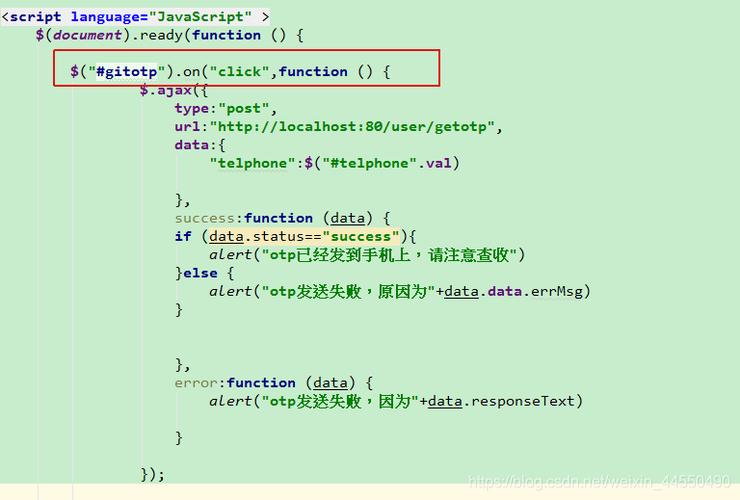
     var request = $.ajax({
       url: "example.com/api",
       type: "POST",
       data: { username: "john", password: "secret" },
       timeout: 10000, // 设置超时时间为10秒
       success: function(response) {
         console.log("成功: ", response);
       },
       error: function(xhr, status, error) {
         if (status === "timeout") {
           alert("请求超时,请检查网络连接");
         } else {
           alert("请求失败: " + error);
         }
       }
     });
4. JSON解析错误
解析错误:服务器返回的数据格式不正确,导致解析失败。
解决方案:确保服务器返回的数据格式正确,前端进行错误处理。
示例代码:
     $.ajax({
       url: "example.com/api",
       type: "POST",
       dataType: "json",
       data: { username: "john", password: "secret" },
       success: function(response) {
         console.log("成功: ", response);
       },
       error: function(xhr, status, error) {
         if (status === "parsererror") {
           alert("JSON解析错误: " + xhr.responseText);
         } else {
           alert("发生了其他错误: " + error);
         }
       }
     });
5. 跨域问题
同源策略:浏览器默认不允许跨域请求,会导致Ajax请求失败。
解决方案:使用CORS(跨源资源共享)头,或者通过代理解决跨域问题。
示例代码:
     // 使用代理解决跨域问题
     const proxyUrl = "https://yourproxyserver.com/";
     const targetUrl = "https://example.com/api";
     $.ajax({
       url: proxyUrl + "?target=" + encodeURIComponent(targetUrl),
       type: "POST",
       data: { username: "john", password: "secret" },
       success: function(response) {
         console.log("成功: ", response);
       },
       error: function(xhr, status, error) {
         alert("请求失败: " + error);
       }
     });
二、Ajax错误处理最佳实践
1.统一错误处理:在全局范围内捕获并处理Ajax错误,避免重复代码。
2.用户友好提示:根据不同错误类型给出相应的用户提示,提升用户体验。
3.日志记录:记录详细的错误信息,便于后续排查问题。
4.重试机制:对于偶发性错误,可以实现自动重试机制。
5.安全性考虑:避免在错误信息中暴露敏感信息,防止安全漏洞。
三、相关FAQs
Q1:如何捕获Ajax请求中的超时错误?
解决方案:可以通过设置timeout选项来捕获超时错误,并在error回调函数中处理。
示例代码:
     $.ajax({
       url: "example.com/api",
       type: "POST",
       data: { username: "john", password: "secret" },
       timeout: 5000, // 设置超时时间为5秒
       success: function(response) {
         console.log("成功: ", response);
       },
       error: function(xhr, status, error) {
         if (status === "timeout") {
           alert("请求超时,请检查网络连接");
         } else {
           alert("请求失败: " + error);
         }
       }
     });
Q2:如何处理Ajax请求中的跨域问题?
解决方案:可以使用CORS头或通过代理服务器来解决跨域问题,如果控制不了目标服务器,可以设置自己的服务器作为代理。
示例代码:
     // 使用代理解决跨域问题
     const proxyUrl = "https://yourproxyserver.com/";
     const targetUrl = "https://example.com/api";
     $.ajax({
       url: proxyUrl + "?target=" + encodeURIComponent(targetUrl),
       type: "POST",
       data: { username: "john", password: "secret" },
       success: function(response) {
         console.log("成功: ", response);
       },
       error: function(xhr, status, error) {
         alert("请求失败: " + error);
       }
     });
Ajax报错的原因多种多样,包括服务器端错误、客户端代码问题、网络问题、JSON解析错误和跨域问题等,通过合理的错误处理机制,可以有效提升用户体验,并帮助开发者快速定位和解决问题。


