
在Android开发中,ViewPager是一个非常常用的组件,用于实现滑动页面的效果,在使用过程中可能会遇到各种问题和报错,本文将详细分析一些常见的ViewPager报错,并提供解决方案。
常见ViewPager报错及解决方案
| 错误描述 | 可能原因 | 解决方案 |
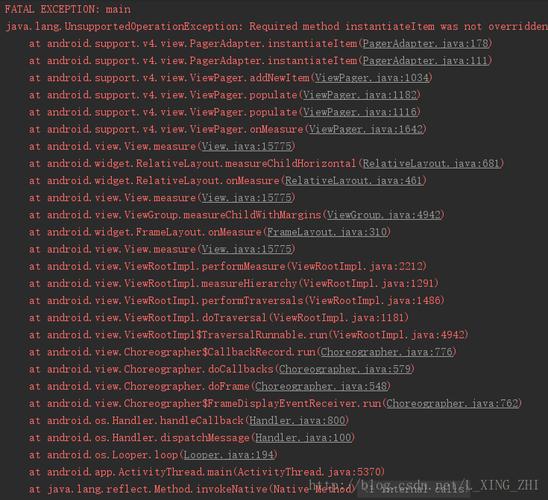
IllegalArgumentException: object is not an instance of declaring class | ViewPager适配器中的getItem方法返回的实例类型不正确 | 确保适配器中的instantiateItem方法正确处理了object参数,并返回正确的实例类型。 |
NullPointerException | ViewPager适配器中的getCount方法返回null或者某个页面对象为null | 确保适配器中的getCount方法返回一个非空的整数,同时确保每个页面对象都正确初始化。 |
ClassCastException | 试图将ViewPager中的页面对象转换为错误的类型 | 确保在ViewPager适配器的instantiateItem方法中,返回的对象类型与期望的类型一致。 |
RecyclerView has no layout manager | RecyclerView未设置布局管理器 | 在RecyclerView的XML布局文件中,添加android:layout_manager="your_layout_manager"属性,或在代码中调用recyclerView.setLayoutManager(new YourLayoutManager())。 |
Fragment does not have an id | Fragment没有ID,导致无法保存状态 | 在Fragment的XML布局文件中添加android:id="@+id/fragment_id"属性,并在代码中使用该ID进行操作。 |
No view found for id | 试图通过findViewById查找不存在的视图ID | 确保在Activity或Fragment的onCreateView方法中,已经正确加载了包含目标视图的布局文件。 |
IllegalStateException: Can not perform this action after onSaveInstanceState | 在保存实例状态后尝试进行Fragment事务 | 将Fragment事务放在post方法中延迟执行,例如viewPager.post(new Runnable() { ... })。 |
java.lang.IndexOutOfBoundsException | ViewPager适配器的position超出范围 | 确保在ViewPager适配器的instantiateItem和destroyItem方法中,传递的position参数在有效范围内。 |
No adapter attached; skipping layout | ViewPager没有设置适配器 | 确保在Activity或Fragment的onViewCreated方法中,已经为ViewPager设置了适配器。 |
深入分析和示例
1. IllegalArgumentException: object is not an instance of declaring class
这个错误通常发生在自定义ViewPager适配器时,适配器的instantiateItem方法返回的对象类型与期望的类型不一致。
public Object instantiateItem(ViewGroup container, int position) {
    // 错误示例:返回了一个非预期类型的对象
    return new SomeOtherClass();
}
解决方案:
确保返回的对象是View类型,并且符合你的需求。
public Object instantiateItem(ViewGroup container, int position) {
    LayoutInflater inflater = (LayoutInflater) container.getContext().getSystemService(Context.LAYOUT_INFLATER_SERVICE);
    View view = inflater.inflate(R.layout.your_layout, container, false);
    container.addView(view);
    return view;
}
2. NullPointerException
这种错误通常发生在适配器的getCount方法返回null,或者某个页面对象为null。
@Override
public int getCount() {
    // 错误示例:返回null
    return null;
}
解决方案:
确保getCount方法返回一个有效的整数,并且在创建页面对象时确保它们不为空。
@Override
public int getCount() {
    return pageTitles.size(); // 确保pageTitles不为空
}
3. ClassCastException
这个错误发生在试图将ViewPager中的页面对象转换为错误的类型。
public Object instantiateItem(ViewGroup container, int position) {
    // 错误示例:试图将对象转换为错误类型
    SomeOtherClass item = (SomeOtherClass) container.getChildAt(position);
    return item;
}
解决方案:
确保对象转换的类型与实际类型一致。
public Object instantiateItem(ViewGroup container, int position) {
    // 正确示例:确保类型一致
    MyCustomView item = (MyCustomView) container.getChildAt(position);
    return item;
}
FAQs
Q1: ViewPager在滑动时出现卡顿怎么办?
A1: 卡顿可能是由于ViewPager中的页面过于复杂导致的,可以尝试以下方法优化:
使用PagerAdapter而不是FragmentPagerAdapter,因为后者会为每个页面创建并保留Fragment实例。
减少每个页面的视图层次结构,避免过度绘制。
使用ViewPager2代替ViewPager,因为它提供了更好的性能和更多的功能。
Q2: ViewPager如何预加载页面?
A2: 可以通过设置offscreenPageLimit属性来预加载页面,设置为3表示ViewPager会预加载当前页面的前后各一个页面:
<androidx.viewpager.widget.ViewPager
    android:id="@+id/viewPager"
    android:layout_width="match_parent"
    android:layout_height="match_parent"
    app:offscreenPageLimit="3" />
或者在代码中设置:
viewPager.setOffscreenPageLimit(3);


