CentOS lnmp 环境搭建详解
LNMP 代表 Linux、Nginx、MySQL/MariaDB 和 PHP,是一种常见的网站服务器架构,本文将详细介绍如何在 CentOS 系统上手动搭建 LNMP 环境,包括各个组件的安装与配置步骤。
准备工作
操作系统:CentOS 7.x 或 CentOS 8.x
内存:建议不小于4 GiB
网络:已分配公网IP地址或绑定弹性公网IP(EIP)
安全组:放行22、80、443端口
SSH 连接:确保可以通过 SSH 连接到实例
一、安装 Nginx
1、安装 EPEL 源

yum install y epelrelease
2、安装 Nginx
yum install y nginx
3、启动 Nginx 并设置开机自启
   systemctl start nginx
   systemctl enable nginx
4、验证安装
在浏览器中访问服务器的公网IP,显示如下页面则表示成功:
Welcome to nginx!
5、配置 Nginx
打开配置文件:
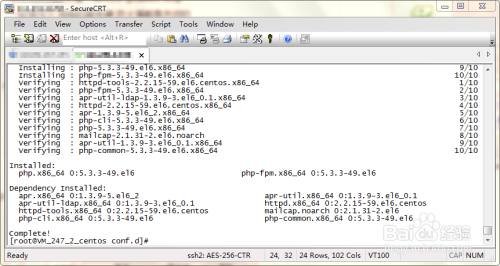
vim /etc/nginx/nginx.conf
修改server 块以取消对 IPv6 地址的监听,并添加以下内容:
   server {
       listen       80;
       server_name  localhost;
       location / {
           root   /usr/share/nginx/html;
           index  index.php index.html index.htm;
       }
       error_page  404 /404.html;
       location = /404.html {
           root   /usr/share/nginx/html;
       }
       error_page   500 502 503 504  /50x.html;
       location = /50x.html {
           root   /usr/share/nginx/html;
       }
       location ~ \.php$ {
           root           html;
           fastcgi_pass   127.0.0.1:9000;
           fastcgi_index  index.php;
           fastcgi_param  SCRIPT_FILENAME  $document_root$fastcgi_script_name;
           include        fastcgi_params;
       }
}6、重启 Nginx
systemctl restart nginx
二、安装 MySQL
1、查看是否已安装 MariaDB
rpm qa | grep mariadb
2、移除已有的 MariaDB(如果有)
yum remove mariadb* y
3、创建 MariaDB YUM 仓库文件
vi /etc/yum.repos.d/MariaDB.repo
写入以下内容:
   [mariadb]
   name = MariaDB
   baseurl = http://yum.mariadb.org/10.4/centos7amd64
   gpgkey=https://yum.mariadb.org/RPMGPGKEYMariaDB
   gpgcheck=1
4、安装 MariaDB
yum install y MariaDBserver MariaDBclient
5、启动 MariaDB 并设置开机自启
   systemctl start mariadb
   systemctl enable mariadb
6、验证安装
mysql V
7、运行安全脚本
mysql_secure_installation
按提示设置 root 密码、移除匿名用户、禁止远程 root 登录等。
三、安装 PHP
1、添加 Remi 仓库
yum install y https://rpms.remirepo.net/enterprise/remirelease7.rpm
2、安装 PHP 及相关模块
yum install y php phpfpm phpmysqlnd
3、启动 PHPFPM 并设置开机自启
   systemctl start phpfpm
   systemctl enable phpfpm
4、验证安装
php v
四、配置 PHPFPM
1、编辑 PHPFPM 配置文件
vi /etc/phpfpm.d/www.conf
修改listen 参数为:
listen = 127.0.0.1:9000
2、重启 PHPFPM
systemctl restart phpfpm
五、整合 Nginx 和 PHPFPM
1、编辑 Nginx 配置文件
vi /etc/nginx/nginx.conf
找到location ~ \.php$ 块,确保fastcgi_pass 指向127.0.0.1:9000。
2、测试 Nginx 配置
nginx t
3、重启 Nginx
systemctl restart nginx
六、部署测试网站
1、创建测试网站目录
mkdir p /usr/share/nginx/html/test
2、创建测试 PHP 文件
vi /usr/share/nginx/html/test/index.php
写入以下内容:
   <?php
   phpinfo();
3、设置权限
   chown R nginx:nginx /usr/share/nginx/html/test
   chmod R 755 /usr/share/nginx/html/test
4、重启 Nginx
systemctl restart nginx
5、访问测试网站
在浏览器中访问http://<your_server_ip>/test,看到 PHP 信息页面则表示成功。
FAQs相关问题解答
1、如何更改 PHP 版本?
可以通过 Remi 仓库来管理和切换不同版本的 PHP,要安装 PHP 7.4,执行以下命令:
yum install y php phpfpm phpmysqlnd enablerepo=remiphp74
然后重启 Nginx 和 PHPFPM:
   systemctl restart nginx
   systemctl restart phpfpm
2、如何配置防火墙以允许 HTTP 和 HTTPS 流量?
使用 firewalld,执行以下命令:
   firewallcmd permanent addservice=http
   firewallcmd permanent addservice=https
   firewallcmd reload