CentOS Apache配置指南
一、安装与启动Apache
安装Apache
在CentOS中,Apache的安装非常简单,你只需要执行以下命令:
sudo yum install httpd y
这条命令将自动下载并安装Apache及其所有必要的依赖项。
启动Apache服务
安装完成后,你可以使用以下命令启动Apache服务:
sudo systemctl start httpd
如果你想让Apache在系统启动时自动运行,可以执行:
sudo systemctl enable httpd
检查Apache状态
为了确保Apache正常运行,可以使用以下命令检查其状态:
sudo systemctl status httpd
如果一切正常,你应该会看到类似于以下的输出:
● httpd.service The Apache HTTP Server
   Loaded: loaded (/usr/lib/systemd/system/httpd.service; enabled; vendor preset: disabled)
   Active: active (running) since Mon 20231120 10:45:12 CST; 1h 20min ago
     Docs: man:httpd(8)
           man:httpdconfig(8)
 Main PID: 1234 (httpd)
   Status: "Total requests: 12, Time taken: 0.0012 seconds"`
二、配置Apache
主配置文件
Apache的主配置文件位于/etc/httpd/conf/httpd.conf,该文件包含了全局配置指令,例如监听的IP地址和端口号,以及默认的文件根目录等。
示例配置
ServerRoot "/etc/httpd"
Listen 80
Include conf.modules.d/*.conf
User apache
Group apache
ServerAdmin root@localhost
虚拟主机配置
通过虚拟主机配置,你可以在一台服务器上托管多个网站,虚拟主机的配置通常放在/etc/httpd/conf.d/目录下的独立文件中。
示例虚拟主机配置
<VirtualHost *:80>
    ServerName www.example.com
    DocumentRoot /var/www/html/example
    ErrorLog logs/example.comerror_log
    CustomLog logs/example.comaccess_log combined
</VirtualHost>
配置网站根目录
默认情况下,网站根目录是/var/www/html,你可以在httpd.conf文件中通过修改DocumentRoot指令来更改它。
修改网站根目录
DocumentRoot "/var/www/newroot"
记得同时修改虚拟主机配置中的DocumentRoot路径。
SSL配置
为了使你的网站支持HTTPS,你需要启用SSL模块并进行相应配置。
启用SSL模块
sudo yum install mod_ssl y
配置SSL证书
编辑/etc/httpd/conf.d/ssl.conf文件,设置SSL证书和私钥路径:
<VirtualHost *:443>
    ServerName www.secureexample.com
    DocumentRoot /var/www/html/secureexample
    SSLEngine on
    SSLCertificateFile /etc/pki/tls/certs/server.crt
    SSLCertificateKeyFile /etc/pki/tls/private/server.key
</VirtualHost>
三、常见问题及解决方案
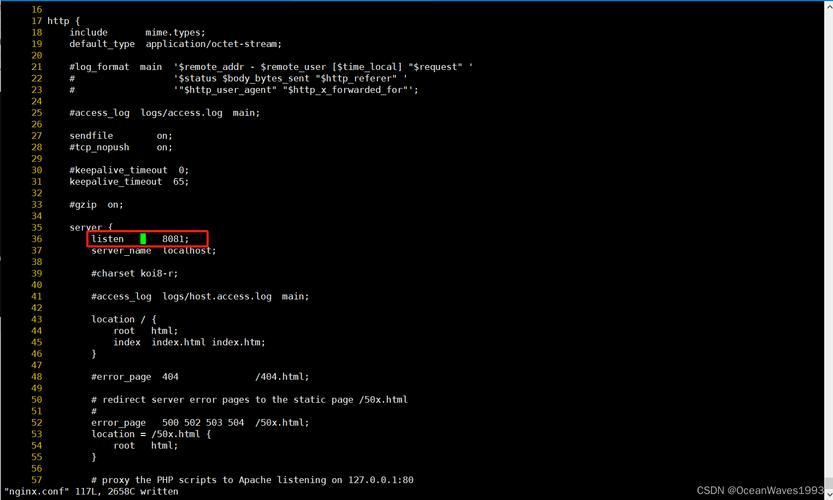
如何更改默认监听端口?
编辑httpd.conf文件,找到以下行并修改:
Listen 80
将其替换为你想要的端口号,例如8080:
Listen 8080
别忘了同时更新防火墙规则以允许新端口的流量。
如何配置基于名称的虚拟主机?
创建一个新的配置文件,例如/etc/httpd/conf.d/namebasedvhost.conf如下:
<VirtualHost *:80>
    ServerName www.example.com
    ServerAlias example.com
    DocumentRoot /var/www/html/example
    ErrorLog logs/example.comerror_log
    CustomLog logs/example.comaccess_log combined
</VirtualHost>
然后重新启动Apache服务:
sudo systemctl restart httpd
如何允许特定IP访问我的网站?
编辑httpd.conf文件或相应的虚拟主机配置文件,添加以下指令:
<Directory "/var/www/html">
    Order allow,deny
    Allow from all
    Deny from all
    Allow from 192.168.1.100
</Directory>将192.168.1.100替换为你希望允许访问的IP地址。
四、归纳
本文详细介绍了如何在CentOS上安装、配置和管理Apache Web服务器,从安装和启动Apache,到配置主配置文件、虚拟主机和SSL证书等方面进行了全面讲解,还提供了一些常见问题的解决方案,帮助你更好地理解和使用Apache,无论是初学者还是有经验的系统管理员,都可以通过本文掌握CentOS上Apache的基本配置和管理技能。