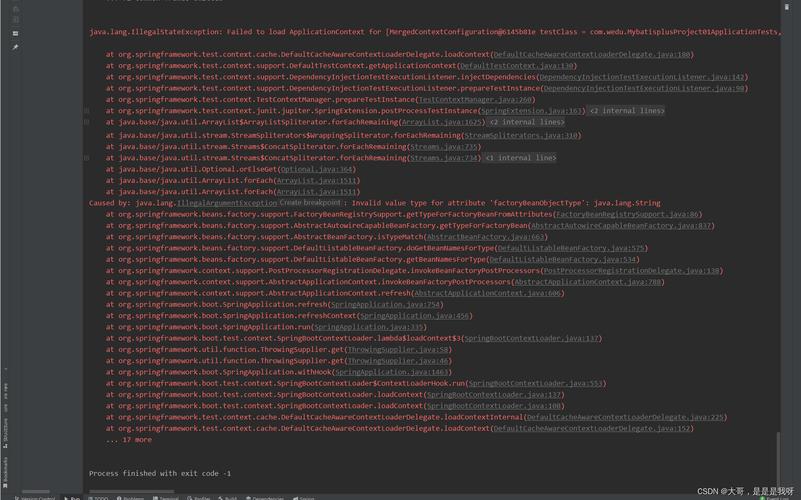
在使用Spring Runner进行单元测试时,开发者可能会遇到各种报错,这些错误通常是由于配置问题、依赖冲突或使用不当引起的,本文将全面探讨Spring Runner报错的常见原因及其解决方法,并提供一些相关的FAQs以帮助开发者更好地理解和解决问题。
Spring Runner报错的常见原因及解决方法
1. 依赖配置错误
在Maven项目中,Spring Runner的使用依赖于springbootstartertest和junit库,如果pom.xml文件中缺少这些依赖,会导致@RunWith(SpringRunner.class)报错。
解决方法:确保在pom.xml中正确添加以下依赖:
<dependency>
    <groupId>org.springframework.boot</groupId>
    <artifactId>springbootstartertest</artifactId>
    <version>2.5.4</version>
    <scope>test</scope>
</dependency>
<dependency>
    <groupId>junit</groupId>
    <artifactId>junit</artifactId>
    <version>4.13.2</version>
    <scope>test</scope>
</dependency>
2. 注解使用不当
@RunWith(SpringRunner.class)注解需要与@SpringBootTest一起使用,以便在测试开始时自动创建Spring的应用上下文,如果缺少@SpringBootTest注解,会导致测试无法运行。
解决方法:确保在测试类上同时使用@RunWith(SpringRunner.class)和@SpringBootTest注解:
@RunWith(SpringRunner.class)
@SpringBootTest
public class MyTest {
    // 测试代码
}
3. 版本不兼容
不同版本的Spring Boot和JUnit可能存在兼容性问题,Spring Boot 1.x和Spring Boot 2.x在依赖管理和注解支持上有所不同。
解决方法:确保使用兼容的版本,对于Spring Boot 2.x,建议使用以下依赖:
<dependency>
    <groupId>org.springframework.boot</groupId>
    <artifactId>springbootstartertest</artifactId>
    <version>2.5.4</version>
    <scope>test</scope>
</dependency>
<dependency>
    <groupId>junit</groupId>
    <artifactId>junit</artifactId>
    <version>4.13.2</version>
    <scope>test</scope>
</dependency>
4. 错误的类路径
有时,IDE可能无法正确识别依赖包的位置,导致找不到SpringRunner类,这可能是由于Maven依赖未更新或项目结构不正确。
解决方法:在IDE中执行“Maven Update Project”操作,确保所有依赖都已下载并正确配置,检查项目的构建路径设置是否正确。
5. 测试类位置不正确
Spring Boot默认从src/test/java目录扫描测试类,如果测试类位于其他位置,可能导致Spring Runner无法识别。
解决方法:将测试类移动到src/test/java目录下,或者在@SpringBootTest注解中指定扫描的基础包。
@RunWith(SpringRunner.class)
@SpringBootTest(classes = Application.class)
public class MyTest {
    // 测试代码
}
相关FAQs
Q1: 如何在Spring Boot中使用JUnit 5而不是JUnit 4?
A1: 要在Spring Boot中使用JUnit 5,需要在pom.xml中添加JUnit 5的依赖,并使用相应的注解,以下是示例:
<dependency>
    <groupId>org.springframework.boot</groupId>
    <artifactId>springbootstartertest</artifactId>
    <version>2.5.4</version>
    <scope>test</scope>
</dependency>
<dependency>
    <groupId>org.junit.jupiter</groupId>
    <artifactId>junitjupiterengine</artifactId>
    <version>5.7.0</version>
    <scope>test</scope>
</dependency>然后在测试类中使用@ExtendWith(SpringExtension.class)代替@RunWith(SpringRunner.class):
@ExtendWith(SpringExtension.class)
@SpringBootTest
public class MyTest {
    // 测试代码
}
Q2: 如何排除特定的Spring Bean在进行单元测试时被加载?
A2: 可以使用@MockBean注解来模拟特定的Spring Bean,从而避免在测试中实际加载该Bean。
@RunWith(SpringRunner.class)
@SpringBootTest
public class MyTest {
    @MockBean
    private MyService myService;
    @Test
    public void testMyService() {
        // 编写测试逻辑
    }
}
通过上述方法,可以有效地控制哪些Bean在测试环境中被加载,从而提高测试的效率和准确性。
Spring Runner报错的原因多种多样,但大多数问题可以通过检查依赖配置、正确使用注解、确保版本兼容以及合理组织项目结构来解决,希望本文提供的信息能够帮助开发者快速定位和解决Spring Runner报错的问题。