以下是有关getjsonarray报错的详细分析:
getjsonarray报错原因及解决方法
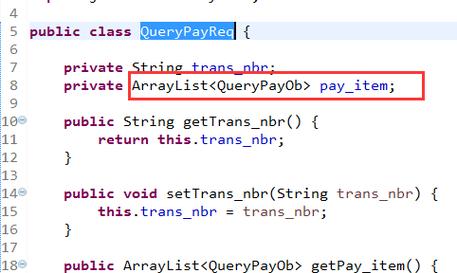
在处理JSON数据时,使用getJSONArray方法可能会遇到各种错误,这些错误可能源于多种原因,包括数据格式不正确、类型不匹配、空值检查不足等,本文将详细分析这些常见错误及其解决方案,并提供相关的代码示例和FAQs。
常见错误及解决方法
1. JSONException: JSONArray[0] is not a JSONArray
原因:尝试从一个JSONArray中获取元素时,使用了错误的方法,当期望一个JSONObject但实际得到了一个JSONArray时,会抛出这个异常。
解决方法:确保使用正确的方法来获取元素,如果第一个元素是一个JSONObject而不是JSONArray,应使用getJSONObject而不是getJSONArray。
import org.json.JSONArray;
import org.json.JSONObject;
import org.json.JSONException;
public class Main {
    public static void main(String[] args) {
        String jsonString = "[{\"name\":\"John\"}, {\"name\":\"Jane\"}]";
        JSONArray jsonArray = new JSONArray(jsonString);
        try {
            // 正确用法
            JSONObject firstObject = jsonArray.getJSONObject(0);
            System.out.println("Name: " + firstObject.getString("name"));
            // 错误用法(会抛出异常)
            // JSONArray nestedArray = jsonArray.getJSONArray(0);
        } catch (JSONException e) {
            e.printStackTrace();
        }
    }
}
2. ClassCastException: java.lang.String cannot be cast to com.alibaba.fastjson.JSONObject
原因:尝试将字符串强制转换为JSONObject时出错,通常发生在解析JSON数据时,数据被错误地当作字符串处理。
解决方法:使用适当的方法将字符串转换为JSON对象或数组,使用JSON.parseObject或JSON.parseArray。
import com.alibaba.fastjson.JSON;
import com.alibaba.fastjson.JSONArray;
import com.alibaba.fastjson.JSONObject;
public class Main {
    public static void main(String[] args) {
        String jsonString = "[\"apple\", \"banana\"]";
        JSONArray jsonArray = JSON.parseArray(jsonString);
        for (int i = 0; i < jsonArray.size(); i++) {
            // 正确用法
            String fruit = jsonArray.getString(i);
            System.out.println(fruit);
            // 错误用法(会抛出异常)
            // JSONObject fruitObject = jsonArray.getJSONObject(i);
        }
    }
}
3. JSONException: expect ':' at 0, actual '['
原因:Fastjson库在解析JSON时遇到格式不正确的JSON字符串,缺少冒号或其他必要的分隔符。
解决方法:确保输入的JSON字符串格式正确,可以使用在线JSON验证工具检查JSON字符串的有效性。
import com.alibaba.fastjson.JSON;
import com.alibaba.fastjson.JSONException;
import com.alibaba.fastjson.JSONObject;
public class Main {
    public static void main(String[] args) {
        String invalidJsonString = "{name:\"John\"}"; // 缺少引号
        try {
            JSONObject jsonObject = JSON.parseObject(invalidJsonString);
        } catch (JSONException e) {
            System.out.println("Invalid JSON format");
        }
    }
}
4. NoClassDefFoundError: net/sf/json/JSONArray
原因:在使用第三方库(如net.sf.json)时,没有正确添加依赖或导入包。
解决方法:确保已将所需的jar包添加到项目中,并在代码中正确导入相关类。
import net.sf.json.JSONArray;
import net.sf.json.JSONObject;
import net.sf.json.JSONException;
public class Main {
    public static void main(String[] args) {
        String jsonString = "{\"name\":\"John\"}";
        JSONObject jsonObject = JSONObject.fromObject(jsonString);
        System.out.println("Name: " + jsonObject.getString("name"));
    }
}
非空判断方法
在进行JSON操作之前,最好先进行非空判断,以避免出现空指针异常,以下是一些常见的非空判断方法:
import net.sf.json.JSONArray;
import net.sf.json.JSONObject;
public class Main {
    public static void main(String[] args) {
        JSONObject jsonObjA = null;
        JSONObject jsonObjB = new JSONObject(); // 即jsonObjB是{}
        JSONArray jsonArrA = null;
        JSONArray jsonArrB = new JSONArray(); // 即jsonArrB是[]

        // JSONObject非空判断
        if (jsonObjB != null && !jsonObjB.isEmpty()) {
            System.out.println("jsonObjB为非空");
        } else {
            System.out.println("jsonObjB为空");
        }

        // JSONArray非空判断
        if (jsonArrB != null && jsonArrB.size() > 0) {
            System.out.println("jsonArrB为非空");
        } else {
            System.out.println("jsonArrB为空");
        }
    }
}
相关FAQs
Q1: 如何将Java对象转换为JSON字符串?
A1: 可以使用JSON.toJSONString方法将Java对象转换为JSON字符串,以下是一个示例:
import com.alibaba.fastjson.JSON;
import com.alibaba.fastjson.serializer.SerializerFeature;
public class Main {
    public static void main(String[] args) {
        Person person = new Person("John", 30);
        String jsonString = JSON.toJSONString(person, SerializerFeature.WriteMapNullValue);
        System.out.println(jsonString);
    }
}
class Person {
    private String name;
    private int age;
    // getters and setters omitted for brevity
}
Q2: 如何处理JSON中的嵌套结构?
A2: 处理嵌套结构时,可以递归地调用相应的方法来提取数据,以下是一个示例:
import org.json.JSONArray;
import org.json.JSONObject;
import org.json.JSONException;
public class Main {
    public static void main(String[] args) {
        String jsonString = "{\"name\":\"John\", \"address\":{\"city\":\"New York\", \"zipcode\":\"10001\"}}";
        JSONObject jsonObject = new JSONObject(jsonString);

        try {
            String name = jsonObject.getString("name");
            JSONObject address = jsonObject.getJSONObject("address");
            String city = address.getString("city");
            String zipcode = address.getString("zipcode");

            System.out.println("Name: " + name);
            System.out.println("City: " + city);
            System.out.println("Zipcode: " + zipcode);
        } catch (JSONException e) {
            e.printStackTrace();
        }
    }
}通过上述分析和示例,希望能帮助你更好地理解和解决在使用getJSONArray方法时遇到的问题,如果还有其他疑问或需要进一步的帮助,请随时提问。